
Customers who come back.
No app. No paper cards.
Just the wallet already on the phone.
Loyaly puts your business straight into Apple Wallet and Google Wallet — a loyalty card that lives on the customer's phone, updates in real time, and brings them back with a lock screen notification.

Illustration only
A programme that fits your business
What kind of business do you run?
Pick your field and see exactly how the card looks, what the customer gets, and why they come back.
Wallet

Demo — the data is illustrative
Clothes are bought by season. Cashback brings her back every season.
In fashion the basket is large and the visit is rare. Cashback turns one ₪690 purchase into credit waiting in her wallet, and pulls her back for the next collection instead of to the shop across the road.
High basket value
A percentage back on every shekel, not a stamp that needs ten visits.
Tiers by spend
A customer who buys more gets more, and sees exactly how far the next tier is.
Back to the fitting room
A lock screen notification when she is near the store, showing the balance she already has.
The customer experience
Three moments. Zero friction.
From signup to the next visit, the whole journey happens inside the phone's wallet. No app download, no forms, no friction.
Illustration only
Add to Wallet
The customer scans a QR in the store or taps a link. Within 5 seconds the card is in the real wallet.
Staff · Rotem
Customer Scan
Line the barcode up with the frame
Dana Cohen · stamped
7 / 10 stamps · seconds ago
Staff scan
Staff open the dashboard in any browser and scan the barcode. The stamp is recorded instantly.
₪12 added to your balance. ₪62 waiting for your next order 🌸
Lock screen alert
The customer sees a lock screen notification — a new stamp, a reward available, or that they're near the branch.
Smart notifications
The right message. At the right time. On the lock screen.
Every Loyaly notification lands straight on the customer's lock screen — with the business logo, with no app and no SMS charges.
Automatic birthday reward
Every customer gets a lock screen surprise on their birthday — a gift, a discount or a free coffee. You set it once and the system remembers forever.
Rotem's Coffee House
Happy birthday! 🎂 Your first coffee is on us — valid this week
Notification when they're near the branch
A customer walking past the branch? The card surfaces on the lock screen by itself — a gentle nudge that brings people in, without sending a single message.
Wallet
Your card is here — you're near Rotem's Coffee House
An update after every visit
After every stamp or earn, the customer gets instant confirmation on the lock screen. They feel the progress, see how far the reward is, and return sooner.
Rotem's Coffee House
Thanks! You've collected 12 coffees 🎉
Reach every customer in one click
New promotion? Seasonal menu? Special event? One send from the dashboard reaches every customer who installed the card, straight to the lock screen.
Rotem's Coffee House
New on the menu: cherry latte 🍒 this month only — come and taste it
The card already on the phone becomes a marketing channel of its own.
Instead of paying for SMS, Facebook campaigns or an expensive app, every message lands directly on your customers' lock screens, with your logo, at zero sending cost.
- Send to everyone, to a segment, or to one person
- Schedule ahead — a Friday morning message for a weekend offer
- No cost per send, and no cap on how many you send
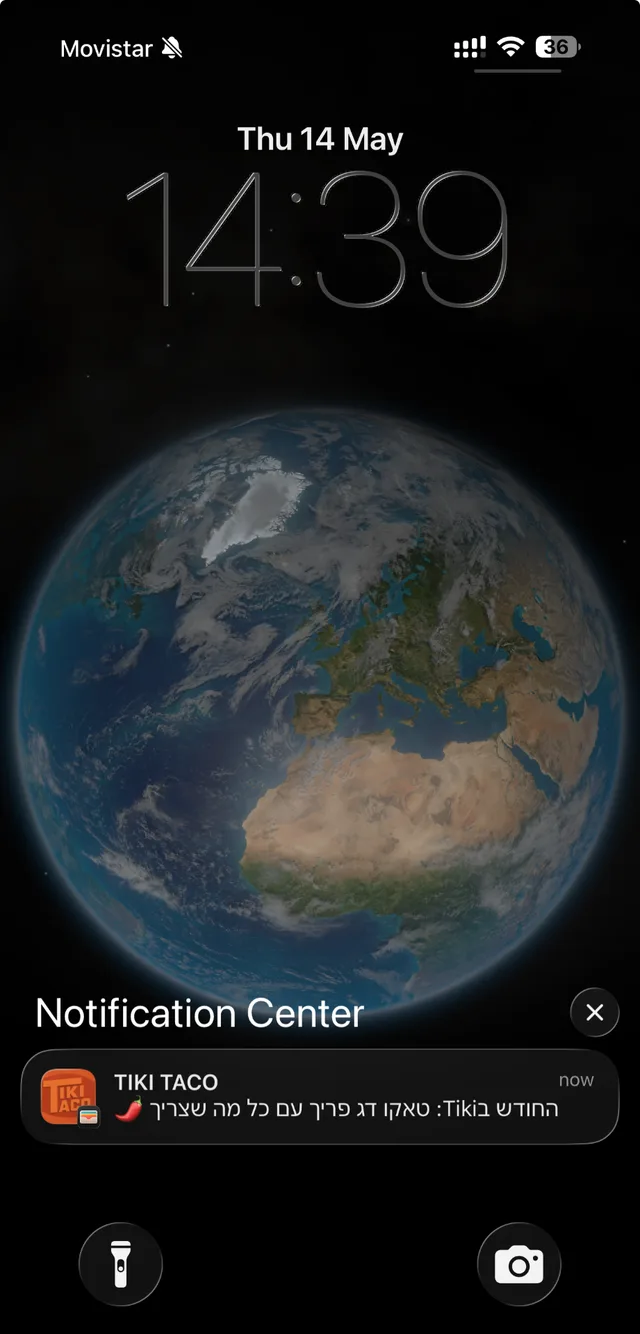
Illustration only
Two kinds of card
Classic stamps, or points with tiers.
Pick the model that fits the business, or run both at once. The customer sees it all on one simple card in the wallet.
Stamp Card
The classic model — 10 stamps and the next coffee is on us. Simple, familiar, and it works. Great for cafés, salons, restaurants and service businesses.
Cashback card with tiers
Percentage cashback that accrues in the wallet, with customer tiers (Bronze, Silver, Gold) that unlock bigger benefits. Great for retail, fashion and VIP clubs.
Online store
Shopify and WooCommerce. One programme, one experience.
The club does not stop at the counter. It lives inside the online store too — same design, same balance, on the store's own domain.
Shopify
A dedicated app for the business. Orders, customers and refunds reach us in real time.
WooCommerce
A WordPress plugin with Gutenberg and Elementor blocks, a signature on every call, and built-in diagnostics.
A full club page inside the store
A complete member page in the brand's own design, on the store's own domain. Balance, tier, rewards and order history — without leaving the site.
Sign in with a code, by phone or email
The shopper identifies with a one-time code, on whichever channel the business has open. No passwords, no second signup.
Join and claim the install gift on the thank-you page
Right after checkout the shopper is offered the club, gets the install gift, and adds the card to the wallet on the same screen.
Redeem cashback as a cart discount code
The shopper chooses how much to redeem, we create a single-use discount code in the store, and the balance drops only when the order closes.
Every order earns automatically
A new order earns stamps or cashback by your programme, with duplicate detection and a reversal when the order is refunded.
Floating widget or in-page block
The merchant chooses: a floating button in the corner, a block inside the page, or both. In the editor the block can be stretched to full width.
A refund takes the credit back
A cancelled or refunded order reverses exactly what it credited, partial refunds included, with nobody having to remember.
Referrals inside the store too
The personal link and the reward work from the club page inside the store, not only from the card page.
We handle the install with you, as the business's own app. We connect the store in a single session.
Messaging channels
Four channels. One decision: who needs to hear it, and when.
The same audience, the same message, and a choice of the channel that fits it. We say up front what costs money and what does not.
Wallet notification
No sending cost, lands on the lock screen with the business logo.
Reaches only customers who installed the card.
SMS
Reaches every customer with a phone number, card installed or not.
Metered per message, bought in bundles.
A branded email with buttons to the card and the club page.
Metered per message. Can be sent from your own domain.
Sent from the business's verified number, in pre-approved templates.
Requires a business number verified with Meta.
Emails go out under your name, not ours.
Add three DNS records and every club email goes out from the business's domain. The screen shows in real time what is verified and what is missing.
- DNS verification, re-checked in one click
- Send a test email before going live
- Falls back to our domain until yours is verified
Email that looks like your brand, with no designer and no agency.
Build the email by dragging blocks, save it as a template, and send it from the business's own domain. The same design powers the emails that go out automatically.
Visual email builder
Drag blocks: heading, image, text, button, divider, reward. You see the result live, without a line of code.
Branded starter layouts
Start from a ready layout already wearing the business's colors, logo and font, and change only what you need.
Saved templates
A design that worked is saved as a template and reused in every campaign, by any team member.
Duplicate a past campaign
Take a campaign that already went out, duplicate it, swap the content and send. Never start from a blank page.
The same design in automated emails
Join, credit, tier upgrade and birthday all go out in the same visual template, not a generic system email.
Consent is checked before every send
The list is filtered by marketing consent, unsubscribes and the quiet window. The number you see before sending is who will actually receive it.
Sending from your own domain
Email from the business's own domain gets opened more and lands in spam less. It is set up once, on one screen.
Your own sender address
Mail goes out from club@your-domain, not a vendor address. The customer sees the business name in the inbox.
Guided DNS verification
A screen showing exactly which records to add at your domain provider, turning each one green the moment it is picked up.
A test send before you go live
Send to yourself, check how it looks on a phone, and only then open the domain for real campaigns.
Customer segments
Don't send to everyone. Send to the people it concerns.
Every filter here exists in the messaging screen itself. Tick conditions, see how many customers match, send on the channel you choose.
Pick conditions
The numbers here are illustrative, based on a sample club.
1,301
customers in this audience
Save the audience, send to it now, or schedule it for later in the week.
Automations
Set it once. It runs on its own.
Everything that runs by itself sits on one screen, as recipe cards you switch on and off.
Birthday gift
A reward goes out by itself on the birthday morning and expires after a number of days you set.
Win back a dormant customer
No visit for X days? One message with a reason to come back, once, without nagging.
Install gift
Anyone who installs the card gets an immediate reward. The teaser line shows in the store and on the card page alike.
Tier upgrade
The customer is notified the moment they move up, and the wallet card updates at the same instant.
Near the branch
The card surfaces on the lock screen when the customer is within the branch radius.
Reminder for an unredeemed reward
A gift is waiting and they forgot? One reminder before it expires.
Journeys
Not one message. A sequence that walks with the customer over days.
A journey is a series of steps with waits between them. You define who enters, what is sent at each step, and when the customer exits.
Example journey: a new member who has not bought yet
- Day 0
Joined the club
A welcome email in the brand template, with the wallet card.
- Day 3
Has not installed the card
A short reminder with the install gift. Anyone who already installed does not get it.
- Day 10
Still has not purchased
A reward with an expiry, on whichever channel is open for this customer.
- Any time
Purchased
The customer exits the journey immediately. No more messages once the goal is met.
A clear entry condition
A journey starts from an event: joining, a first purchase, a tier upgrade or a long absence.
Waits between steps
Each step waits the days or hours you set, and sends at a reasonable hour rather than the middle of the night.
Immediate exit on the goal
The moment the customer does what we wanted, the journey stops. No message keeps chasing them.
Two journeys at most, in parallel
A customer never lands in five journeys at once. A hard cap protects their inbox.
At the counter
Two seconds at the till. No more than that.
Anything done in front of the customer has to beat digging a paper card out of a wallet. That is the test.
One NFC tap
A sticker on the counter. The customer taps their phone and the card opens — no scanning, no typing.
Scan from any browser
Staff open the screen on a phone or a computer and scan. No app to install, no hardware to buy.
Look up by phone number
Customer left their phone at home? Type the number, find the card, stamp it.
Branches and permissions
Several branches under one club, where staff see only what they need and the owner sees everything.
Refer a friend
Your best customers bring the next ones.
Both sides get rewarded, you set the amounts, and the invitation copy shows in the store and on the card page.
A personal link for every member
Each customer gets their own link from the card page or the club page in the store.
The friend joins
The joiner gets a wallet card and the reward you promised, right at signup.
The reward unlocks on the first purchase
The referrer is paid only after the joiner actually buys. If the order is cancelled, the credit is reversed.
The dashboard
The whole business on one screen.
Live statistics, customer management, marketing automations and till scanning — all in the browser, nothing to install.
Business management
Rotem's Coffee House
1,284
Active customers
3,920
Stamps this month
64
Gifts sent
182
Rewards redeemed
30-Day Activity
Scan
CRM
Alerts
What's included
Everything a retail business actually needs.
Real Apple & Google Wallet
A digitally signed .pkpass card. In the wallet within seconds.
Lock screen notifications
Every stamp and every reward shows straight on the lock screen.
Smart geofencing
The card surfaces when the customer enters the branch radius.
Scanning from the browser
No apps. Staff scan straight from the screen.
Stamps or points
A classic stamp programme or percentage cashback, whichever fits.
Built-in automation
Birthdays, win-backs, lapsed customers — all scheduled.
Live statistics
Who comes back, when visits cluster during the week, and which ages your customers actually are.
Import customers from a file
Upload the existing customer list, even tens of thousands of rows, and see exactly what went in and what was rejected.
API for integrations
Issue a key, read a balance, credit and redeem — to connect other systems you already run.
Security and privacy
Full separation between businesses, an access log on every customer record, deletion on request, and Amendment 13 compliance.
A point-of-sale integration is in development and arrives later this year.
Security and privacy
Your customer list is the asset. We treat it that way.
A loyalty club collects names, phone numbers, birthdays and purchase history. Before you hand that over, you deserve to know exactly who can see it, what is recorded, and what happens when a customer asks to be erased.
Full separation between businesses
Every row in the database belongs to one business, and access rules in the database itself block reaching another. Even a faulty query cannot return someone else's customer.
Role-based permissions
Owners, branch managers and cashiers see different screens. A cashier has no export, no deletion and no access to billing settings.
Customer view logging
Every time a staff member opens a customer card it is recorded: who, when, and in which business. The record is kept for 12 months and holds no customer details.
An append-only action log
Credits, redemptions, tier changes, sends and deletions are written to an irreversible log. An existing record cannot be edited or deleted, not even from admin.
Encryption in transit and at rest
All traffic is TLS encrypted, data is encrypted at rest, and keys and secrets live in a dedicated vault, never in code or a config file.
Every integration call is signed
Every call from the online store is signed and verified on our side. An exposed key can be revoked instantly without touching the other connections.
One-time code sign-in
A customer signs in to the club page with a code sent by phone or email. There are no passwords to store, and viewing a balance does not allow spending it without re-confirming.
Alerts on unusual activity
An unusually large export, repeated sign-in attempts or a change to sensitive settings raise an alert with us immediately, with thresholds you can tune.
Privacy, in questions and answers
Who owns the customer list
The business does. We are processors only, acting on the owner's instructions, and we never use the list for anything else. No selling, no sharing with advertisers, no cross-matching between businesses.
Amendment 13 to the Privacy Protection Law
The system was built to the requirements now in force: a database definitions document, access logging, a security incident procedure, rights of access and erasure, and a signed data processing agreement with every business.
Marketing and consent
Marketing consent is stored separately from club membership, with a date and a source. Every message passes a policy gate that checks consent, opt-out and quiet hours before it is sent.
A customer erasure request
A customer asks to be erased and the request lands on a dedicated screen. Erasure removes identifying details, leaves an anonymous statistic for reporting, and is logged with the time it was carried out.
How long data is kept
A customer with no activity for 24 months is marked dormant and queued for erasure. System logs are kept for a fixed, predefined period, not forever.
Development environment
We never build or test against real customer data. There is a synthetic test club, and restoring a real backup into a test environment is blocked.
Daily backups
Automatic backups with point-in-time recovery, and periodic restore testing.
Data processing agreement
A signed DPA with every business, including the subprocessor list and where the servers sit.
A clean exit
A business that leaves receives a full export of its data, followed by a logged deletion.
Security incident procedure
An incident is recorded, classified and reported within the timeframes the law requires, with the full handling documented.
Connecting the in-store register
The online store side is live and working: Shopify and WooCommerce credit, redeem and reverse on their own. What is left is the physical register in the branch. Today crediting at the counter takes seconds from the browser, and soon it will happen by itself from the register, with nothing for the cashier to remember.
The receipt credits by itself
The cashier closes the sale and the stamp or cashback lands on the card at that moment, with no extra screen and no double entry.
Redemption inside the sale
The chosen reward comes off the total at the register itself, and the redemption is recorded with the transaction number.
Identification in store
A phone number, a scan of the wallet card or a tap on the NFC tag at the counter, and the same customer opens at the register.
End of day reconciliation
A daily comparison between register transactions and club credits, so not a single shekel goes missing or doubles.
Until the direct integration is ready, our open API already lets a POS vendor credit and redeem. If you want to be among the first to connect, we would love to talk.
5 seconds
to add a card to the wallet
0
apps to download